
How to Choose the Best Restaurant Inventory Management Software (Compared)
How to Choose the Best Restaurant Inventory Management Software (Compared)
!How to Choose the Best Restaurant Inventory Management Software
The Spreadsheet Spiral: Why Old Methods Break Down
You know the drill. Green cells. Red columns. A dozen version numbers with initials no one remembers. One late order, and suddenly everyone’s asking where that “master copy” went.
Sound familiar? You’re not alone.
Manual inventory tracking isn’t just tedious. It’s risky. Lost invoices, accidental double orders, bulk receipts with missing item counts… it all adds up. Waste sneaks in. Orders get missed. Staff start blaming each other (and you).
And at the end of the week? You’re still not sure what’s in stock, what’s wasted, or what that last-minute vendor swap cost you.
The Real Cost of “Good Enough” Inventory Tools
- Hours lost every week to manual entry
- Missed deals because orders arrive late
- Staff frustration and blame games over wrong counts
- Surprise shortages on best-sellers
- Stunted margins from waste and overbuying
The worst part? All of this is totally avoidable.
What Actually Matters: Your “Inventory Stack” Checklist
Not all restaurant inventory management software is built for real kitchens. Before you demo another tool, grab your coffee and rate these must-haves:
1. Single-Cart Ordering
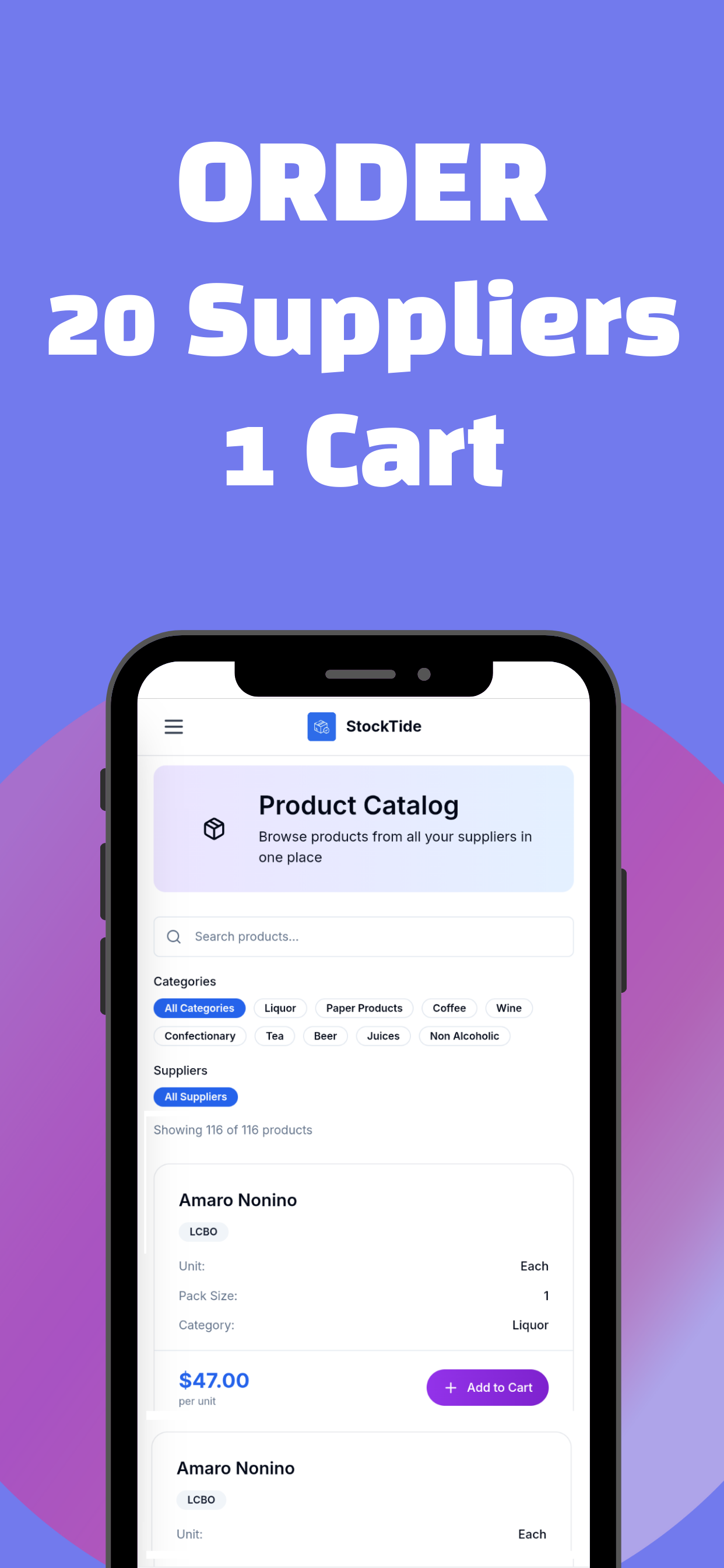
Ever placed five orders for the same night, one email, two calls, a supplier portal, and an app that keeps logging you out? Now imagine: every vendor, every product, one checkout. Like Amazon, but for your restaurant.
2. Real-Time Inventory Insights
See how many bottles you used before dinner even starts. Track what’s 86’d after the shift. Know exactly what runs out: before it hits the customer.
3. Supplier Management (Without The Chaos)
Filter by supplier. Compare prices instantly. Ditch the endless sticky notes and late-night “Did we order from ___?” texts.
4. Error-Proof Analytics
Spreadsheets forget. People copy/paste wrong numbers. You need a digital trail that shows who ordered what, when, and at what price. Not last year’s counting sheet.
5. Scalability for Multi-Universe Ops
Running two locations? Twenty? You need a system that shows everything at a glance, not ten browser tabs and a prayer.
How the Best Stack Up: Top Picks, Side-By-Side
Here’s a table breaking down solutions for each type of operator:
| Restaurant Type | Recommended Solution | Why It Works |
|---|---|---|
| Multi-Location | Operandio, Restroworks | Real-time dashboards, centralized audits |
| Fast-Delivery, POS-Heavy | Toast xtraCHEF | Free tier, solid POS integration |
| Complex Menu, Cost Control | MarketMan | Menu costing, detailed supplier management |
| All-In-One Accounting | Restaurant365 | Unified accounting, inventory, scheduling |
| Multi-Unit Growth | Crunchtime | Scales up easily, best-in-class analytics |
| Restaurants Who Need Fast Ordering | StockTide by xTide | Unified catalog, one-cart-all-suppliers, instant insights |
Want to see StockTide in action? It’s built for operators who hate chasing down purchase orders.
What Makes StockTide Different?
The One-Cart, All-Supplier Approach
You browse. You search by category or supplier. You add to your cart: across every vendor. Checkout once. Done in minutes.
- No more bouncing between portals.
- No missed line items.
- One receipt to match to invoices and deliveries.
Real-Time = No More Guesswork
Stock moves, menu changes, you’re covered. At any moment, see exactly what’s available. If your best-seller is running low, you’re alerted: no last-minute surprises.
Built for Teams, Not Just Managers
No more “who-clocked-what” confusion. Staff can see what needs restocking. Front and back of house are always aligned.
How To Pick The Right Tool (In 3 Steps)
Ready to switch? Here’s how to make the leap without the regret.
1. Map Your “Inventory Pain Points”
Write down your top three recurring headaches. Vendor confusion? Overbuying? Not knowing what you’re short on until it’s too late? Focus on solutions that fix these first.
2. Compare Your Actual Use Cases
Test each tool as if it’s already replacing your spreadsheet—don’t let the salesperson drive. Order something from your top 3 suppliers. Run a depletion report. See what takes under 5 minutes and what still feels like busywork.
3. Onboard Your Team, Not Just Your Manager
If your team hates the tool, it won’t work. Choose a system with simple onboarding, shareable dashboards, roles for each shift. See who adapts smoothly—and where you hit friction.
Features That (Actually) Move the Needle
Unified Catalog:
Shop every supplier, filter by need, order everything at once.
Intelligent Alerts:
Low stock, price changes, missed counts: flagged before they become problems.
Automated Receiving:
Mark deliveries. Update counts with a click. No more late nights punching numbers into Excel.
Mobile-First Dashboard:
Inventory check-in at the shelf, not the office.
Multi-Unit Analytics:
Chain-level insights from anywhere. See how one store compares to the rest.
Simple Integrations:
Connects to your POS, accounting, and even tip management if you’re running full xTide.
The Real-World Wins
Picture this:
- Your chef orders pantry staples from three arms of your supplier network: in two clicks.
- Your bar manager spots a low-bottle alert, re-ups before the weekend rush.
- Your accounting lead matches invoices to digital receipts, no chasing paper trails.
What do you not get?
Frantic late-night runs. Frustrated team huddles. Margin-killing write-offs from overstock or spoilage.
What Your Next Week Could Look Like
- Inventory tracked in real time, not “whenever someone remembers the spreadsheet.”
- Best-sellers never 86’d at peak hour.
- Every supplier in your pocket: no more digging for numbers or chasing separate emails.
Still on the Fence? FAQs
"Will this work with my existing POS?"
Most modern solutions (including StockTide) integrate quickly. Check for your exact provider or ask for a demo.
"What if my staff aren’t techy?"
StockTide is mobile-friendly and dead simple to train. Most teams are up and running in under a shift.
"Do I have to switch all my locations at once?"
Nope. Start with one, see the results, then roll out as fast (or slow) as you want.
"Is this worth the monthly fee?"
Hours saved. Waste reduced. Team drama killed off. Margins protected. It usually pays for itself in month one.
Ready to Try StockTide?
Join restaurants already saving hours—and their sanity—by ditching spreadsheets for good.
No credit card required • 30 days free
Ready to try xTide?
Start your free 30-day trial and see how xTide can streamline your restaurant operations.
Start Free Trial